Showing posts with label Games. Show all posts

Thursday, February 21, 2019

reactorX - My 2019 BASIC 10 Liner

I've always been attracted to the strange arcade games. At the arcade in 1984, you might have found me wasting my quarters on Zaxxon. I didn't have to wait in line because no one else wanted to play it. But those isometric graphics lured me in. Gottlieb made some off beat games: Q-Bert, Mad Planets and Reactor. The sound on those machines is impressive and was authored by David Thiel.

I decided to create this year's 10 liner based on Reactor. I call it Reactor-X. It has three moving sprites plus the player's ship. Use your ship to bump the particles into the outer wall before the reactor core swells and goes into meltdown. Grab it over on my GitHub.
reactorX - 2019 BASIC 10 Liner Contest
The fast moving particles with complete multi-body collisions seen in this play-through were made possible using a new integer BASIC for the Atari called FastBasic. (I used Version 4.0.)

Instructions:
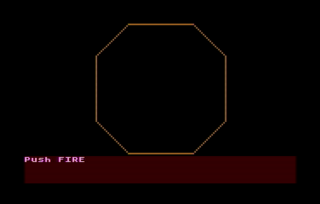
1. The opening screen shows the outer wall. Press the FIRE button to start.
2. You control the white +-shaped ship with your joystick. The three rogue atomic particles start on the other side of the core.
3. The particles do a random-walk while seeking out your ship. The bounce off of each other when they collide.
4. Gain points by hitting the particles with your ship.
5. The reactor core grows over time pushing your ship and the particles towards the deadly wall.
6. Use your ship to bump the particles towards the outer wall.
7. Be careful because the particles can bump you towards the wall, too! You have 5 lives.
8. Bump the particle into the wall to destroy it.
9. Two win, bump all three particles into the wall before the core swells too big!
Here's the compressed 10-line code:

Let's dig into the code:
data D() WORD = -1,1,2,2,1,-1,-2,-2,-1,1,2 Array to store info to draw an octagon. The drawing routine is at the bottom of the listing.
data x() WORD = 0,10,0,-10,0
data y() WORD = -20,20,20,20,0
Arrays to store X and Y positions of sprites with initial positions. Fifth index is the origin so I can reuse physics code.
dim alive(4), colsnX(4), colsnY(4) Arrays that store alive/dead state of PM's and changes in position due to collisions.
numkilled = 0
numlives = 5
score=0
rate = 15
counter = rate-1
Initialize some counters.
graphics 7
poke 752,1
Use 4 color 160x80 mode
Turn off cursor in text window
PM=$A000 mset $a000,1024,0
poke 54279,PM/256
poke 53277,3
poke 559,46
Clear out some RAM
 Tell ANTIC where PM RAM is' Enable PM display
Enable PM DMA with 2-line res
dpoke 704,$440F
dpoke 706,$4444
dpoke 709,$404F
Set colors for players 0 and 1,
players 2 and 3, and
the text window
x0=80
y0=40
color 1
radius = 19
exec octagon
Store the coordinates for the center of the screen.
Pick color 1, default is orange
Set the radius to draw the large octagon. Call the routine at the end of the listing.
?"Push FIRE" WHILE STRIG(0):WEND CLS Wait for player to start the game.
WHILE numkilled < 3 AND numlives> 0 This begins the main game loop
  alive(0) = 0 Reset the player is still alive flag.
  inc counter
  setcolor 1,counter,15
  if counter MOD rate = 0
    color 2
    radius = counter/rate
    exec octagon
  endif
Take care of the background graphics. Increment a counter to rotate the colors using the SETCOLOR command. Draw a larger octagon to enlarge the core every RATE game loop cycles. The EXEC OCTAGON jumps to the drawing routine at the end of the listing.
  poke 53248,x0+44+X(0)
  move adr(" -stuff-")+1, PM+$200 + y0 + 9 + Y(0), 17
Move player location. Poke the X coordinate and MOVE memory for the Y coordinate. The sprite is defined by the string, which starts at one byte higher than the address in FastBasic.
  for i=1 to 3
    move adr(" ball " ) + 1, PM + $200 + i*128 + y0 + 9 + Y(i), 14
    poke 53248+i,(x0+43+X(i))*(alive(i)=0)
  next i
Loop to move each  particle location. If particle is dead, keep it off the screen.
  poke 53278,1
  PAUSE 1
Clear collision register and paint the screen once to record collisions.
  for i=0 to 3 Loop through all the PM's
    colsnX(i) = 0
    colsnY(i) = 0
Initialize the collision accumulators...
    PiPF = peek(53252+i) Check the player-player collision register.
    if PiPF&1 = 1
      alive(i) = 1
Someone hit the wall! Set the alive/dead flag.
      if i = 0
        X(i) = 0
        Y(i) = -2*radius
        dec numlives
        mset PM+$200,128,0
        exit
It was the player's ship. Reset it's position and take away a life. Exit the collision detection loop.
      else
        X(i) = -43-x0
        inc numkilled
      endif
It was a particle. Kill it and remove it from the screen.
    elif PiPF&2 = 2
      freq = 80
      j=4
      exec bounce
    endif
Something hit the core. Make it bounce and get ready to play a tone.
    PiPj = peek(53260+i) Now check for player collisions. The 'i' value is subject player and 'j' value is player that was hit.
    if PiPj > 0 Act if there was a collision.
      if PiPj&1 = 1
        freq = 40
        j = 0
        score=score+5
The ship made a hit. Get some points and get ready to play a high-pitched tone.
      elif PiPj&2 = 2
        j = 1
      elif PiPj&4 = 4
        j = 2
      elif PiPj&8 = 8
        j = 3
      endif
Check for collisions with the particles.
      exec bounce Compute bounce position change.
    endif
  next i
Close the loop.
  if freq>0
    sound 0,freq,10,15
  else
    sound
  endif
  freq = 0
Play a tone or stop the tone, if needed.
  for i=1 to 3
    X(i)=X(i) - SGN((X(i)-X(0))/10) + colsnX(i) + RAND(3)-1 -(X(i)/33)
    Y(i)=Y(i) - SGN((Y(i)-Y(0))/10) + colsnY(i) + RAND(3)-1 -(Y(i)/33)
  next i
Update particle locations: attract to player, add in the bounce, do a little random walk, and stay away from the walls.
  P.657,2
  ? score, numlives;
Update the scoreboard. The POKE command positions the cursor before printing to the screen.
  S=STICK(0)
  LR=(S&4=4)-(S&8=8)
  UD=(S&1=1)-(S&2=2)
  Y(0) = Y(0) + colsnY(0) + UD+UD
  X(0) = X(0) + colsnX(0) + LR+LR
Get joystick input and move the player. Also add in the player bounce move.
WEND End of game loop.
SOUND Game over. Stop the sound.
if numkilled=3 and alive(0)=0 
  ?;"You Win!";
else
  ?;"/MELTDOWN\";
endif
Figure out the result.
do
loop
Wait forever.
proc bounce
  colsnX(i) = colsnX(i) + 2*SGN(X(i)-X(j))
  colsnY(i) = colsnY(i) + 2*SGN(Y(i)-Y(j))
endproc
Procedure to add in bounce motion. The motion is towards the ith particle and away from the jth particle. When j=4, the motion is away from the origin.
proc octagon
  plot x0-radius, y0 + 2*radius
  for p = 1 to 8
    drawto x0 + D(p)*radius, y0 + D(p+2)*radius
  next p
endproc
Procedure to draw an octagon. Loop through the vertices and draw lines. Scale the size by 'radius.'

Sunday, March 4, 2018

DEFENDER - 2018 BASIC 10-Liners Game Contest Entry

My first (and maybe only) entry to the 2018 10-Liner BASIC Game competition is an Atari Turbo-BASIC XL implementation of the 1981 arcade game DEFENDER.
It is entered into the EXTREM-256 line-length category. Defender is a side-scroller, which is why I chose to try it. I had been trying to figure out how to do fast horizontal scrolling with BASIC and eventually landed on the technique used here. Find it over on GitHub or download the auto-loading ATR file.

The Atari ANTIC video processor is driven by a micro program called a Display List (DL). The DL has one entry per line of graphics and defines a number of things including the graphics mode and an optional starting address for the data. As described in De Re Atari, one uses an expanded screen memory and merely specifies the starting address for each line of graphics to be displayed. In an assembly language program, the starting addresses can be updated during a vertical blank. The trouble with BASIC is that computing and poking addresses inside FOR-NEXT loop is not nearly fast enough to be satisfactory. I realized instead, I could build a precomputed look up table (LUT) and store it in RAM. Then using Turbo-BASIC's MOVE command, I could rapidly update the display list with the appropriate data to get fast side scrolling.

Once I had the side scrolling, everything else slowly fell into place. I created a random mountain generator. I wanted a radar display. Then I had to compromise on the AI's because the computational load was getting a little high for the game loop. I developed the AI's in graphics mode 0 with only 40 columns of playfield. This was enough to see the overall behavior and get a satisfactory result. Here's a screenshot of the final prototype. See the "(" kidnapping the "$"?
At this point, my program was 12 lines long. I settled on static bad guys except for special abductors who descend to kidnap your citizens. If you successfully terminate an abductor in the act, the citizen gracefully floats to earth. Be careful not to takeout a citizen accidentally - friendly fire is gruesome but challenging.

The Code

Here's the obfuscated 10-liner produced by DSMC's tbxl-parser.
The most straightforward code to analyze is here. It doesn't use any compression techniques and the AI code is separated out for each character type. This code parses into too many lines. The first task I did was to copy the compression techniques developed by Victor Parada for Space Ranger. This got be down another line. Then I tackled the AI logic, which had lots of duplicated commands to update the playfield and radar display. I matched up the AI's with the most common logic and screen update code and combined them together. This got me down to 10 lines plus the ?"game over" statement. I then found two POKES which I combined into a single DPOKE. That did it. 

Here's the final source file with expanded comments:
'-----------------------------------------------------------
'
'                       DEFENDER
'
'For Atari 800XL 8-Bit BASIC 10-Liner
'One-player game with joystick
'
'Jeff Piepmeier
'January 31, 2018
'
'--Parsed with TurboBASIC XL Parser Tool 
$options +optimize
'-- Tested on Altirra
'-- bitmap graphics developed with Mad Studio
'-- POKE/MOVE compression technique copied/adapted 
'from Victor Parada's Space Ranger
'-----------------------------------------------------------

First is a very long string of ATASCII for storing addresses and data. The first 6 characters are a very short display list described below. Then there are 8 pokes and some player-missile data followed by some POKEY sound settings.

'a whole bunch of data for POKES and MOVES
A=ADR("\46\62\BF\41\50\A0\6F\A0\00\07\D4\B0\C0\02\08\1D\D0\03\6F\02\31\2F\02\3E\F4\02\B8\62\BF\E2\04\08\D0\01\03\03\03\04\C4\02\0E\36\D6\88\03\AC\A0\41\50\A0\04\56\A0\00\4E\50\A1\08\20\B8\30\38\30\20\70\20\20\70\08\28\B8\7C\D6\D6\7C\38\7C\54\92\14\2A\B3\90\90\90\90\90\90\90\90\90\90\90\90\90\90\90\90\90\90\90\90\06\04\B2\20\70\F8\7E\FF\70\06\0E\B2\04\0E\1F\7E\FF\0E\04\00\D2\C0\AF\C1\AF\00")

'make a string of spaces to use a couple different places
DIM A$(4)
A$="    "

I use graphics mode 15 because it's well suited to the radar display and it zeros out a whole bunch of RAM. There's enough RAM to contain the radar, playfield, PM graphics and custom character set. Here's the memory map I made to keep track of everything:
C000-------------
Text Screen
BF60-------------
BC00-------------
Character Set
B800-------------
Player 3
B700-------------
Player 2
B600-------------
Player 1
B500-------------
Player 0
B400-------------
Missiles
B300-------------
B140-------------
Character GFX
A4C0-------------
Bitmap GFX
A150-------------
A0AB-------------
Display List
A050-------------
9FD0-------------
Look Up Table
7F00-------------

'base the memory map on graphics mode 15
GR.15

I move the text window to the first line of the screen and use graphics mode 2. The LUT takes so long to build, I decide to speed it up some by temporarily using a wait for vertical scan command right after the first line of text. This probably speeds things up 30-40%. I wanted to have a countdown displayed so the user would know the program was working.

'START: build new display list
'SHORTEN DISPLAY LIST SO STEAL FEWER CPU CYCLES one line of graphics 1 mapped to text window; wait for vertical scan
'MOVE ADR("\46\62\BF\41\50\A0"),$A053,6
MOVE A,$A053,6
A=A+6

The side-scrolling feature needs a look-up table (LUT) whose entries can be quickly copied into the display list to create the scroll. This nest loop computes the LUT and stores in RAM below the video.

'write coarse-scrolling LUT to RAM below video
FIELDWIDTH = 160
LUT=$7F00
ADDR=LUT
LINEONE=42176 : REM start of character graphics in video ram
FOR COLS=0 TO 139
    ? 139-COLS;A$;
    FOR ROWS=0 TO 19
        POKE ADDR,86 : REM GR.1 CHARACTER MODE; DP. TAKES 1 LESS CHAR THAN POKE
        DPOKE ADDR+1,LINEONE+COLS+ROWS*FIELDWIDTH
        ADDR=ADDR+3
    NEXT ROWS
    POKE 657,2
NEXT COLS

There are several POKE commands needed to set up the PM graphics - the addresses and data are stored in the giant string in the first line.

REM COMPRESSED CODE GOES HERE
FOR I = 1 TO 8
    POKE DPEEK(A),PEEK(A+2)
    A=A+3
NEXT I

The ROM character set is copied into RAM so it can be modified. The modifications are done by copying custom characters stored above into RAM and by remapping some of the characters to different locations. The remapping is done below.

'copy the ROM character set for modification
MOVE $E000,$B800,512

Copy data out of the string above in to RAM. This code is "borrowed" from http://www.vitoco.cl/atari/10liner/RANGER/. The first byte in the record is the number of bytes to be copied. The second two are the target 16-bit address. The remainder are the data. The process is repeated until a 0 is encountered. The very last move turns on two sound channels to create a beating low-E sound similar to the start of the arcade Defender.

REM # BYTES, TARGET ADDRESS (LO/HI), DATA
B=PEEK(A)
WHILE B
  MOVE A+3,DPEEK(A+1),B
  A=A+B+3
  B=PEEK(A)
WEND

I adapted this technique to be able to copy memory from one location to another. I move the ATASCII line art characters to a different location in the character set and I copy the bad guy character to multiple locations in the map. I need multiple copies because I use the character code to store the AI identities in the screen memory itself. This avoids needed to keep track of too many things with arrays.

'copy some memory around, including remapping some characters
A=ADR("\30\E2\08\B8\10\68\E2\18\B8\08\28\B8\30\B8\18\00\B8\48\B8\08\03\B2\10\B9\08\62\BF\63\BF\02")
FOR I=1 TO 6
    MOVE DPEEK(A),DPEEK(A+2),PEEK(A+4)
    A=A+5
NEXT I
REM END COMPRESSED CODE

I wanted to have the mountains in the play field and though having the randomly generated might be more compact that storing a predetermined set. This loop randomly picks up/straight/down directions on each iteration and draws the mountains on the playfield and radar. The ATASCII line art characters were remapped so the screen codes are 1, 2 and 3. This makes poking them into RAM straightforward. Also, they needed to be moved into the lower 64 characters to be accessible in graphics mode 2. Finally, note here and everywhere else below there are both POKE and PLOT commands to put things on the playfield and radar display. This dual display code in part forces me into the EXTREM-256 category.

'draw the mountains
QUARTER = 39 : REM 79-FIELDWIDTH/4, used in the radar display
COLOR 2
Y=1
FOR I=0 TO (FIELDWIDTH-1)
    'choose random slope
    R=RAND(3)+1
    'check for top or bottom boundaries
    R=R+(Y=0)*(R=1)-(Y=5)*(R=2)
    'increase height if needed
    Y=Y-(R=1)
    'insert character into last 5 rows of map
    POKE $A4C0+(Y+14)*FIELDWIDTH+I,R+64 
    PLOT QUARTER+I/2,15+Y
    'decrease height if needed
    Y=Y+(R=2)
NEXT I

This little bit draws the outline for the radar display. The radar display was an important feature to have for me. Besides just being darn cool, it allows the player to see if his citizens are being kidnapped.

'draw the RADAR outline
COLOR 3
PLOT 0,21 : DRAWTO 159,21
DRAWTO 78-40,21 : DRAWTO 78-40,0
DRAWTO 80+40,0 : DRAWTO 80+40,21

To speed up AI processing, I store abductors and citizens in a 2-D array. The abductors are initially hidden and coded with a value of 9 in the screen memory. The players are placed on the screen above the mountains so they can drop down. I take advantage of the AI behavior so I don't have to remember where the mountains are.

'generate abductors and victims
NA = 9
DIM AI(NA,2)
FOR I=0 TO NA-1
    REPEAT 
        PX = RAND(FIELDWIDTH) : REM X LOCATION OF PEOPLE
        PPX = LINEONE+13*FIELDWIDTH+PX 
    UNTIL PEEK(PPX)=0
    AI(I,1) = PPX : REM PLAYFIELD ADDRESS
    POKE PPX,$04 : REM INSERT PEOPLE
    AI(I,2) = LINEONE+PX
    POKE LINEONE+PX,NA : REM INSERT LATENT ABDUCTOR, NA HAPPENS TO = 9 which is char code
NEXT I

I initially tried to have the other bad guys move around, but it just was too slow, took too much code space and didn't add much to the game play. So they are static and simply inserted into the screen. There's a small chance of 1:1440 that one will be placed right where the hero's ship starts. It's only happened to me once during testing. I didn't try to squeeze in logic to avoid that - I suppose a single POKE of a 0 into that location would do the job. Alas.

'generate some static bad guys
'always slim chance one lands on ship at start, but that's a feature
FOR I=1 TO 20
    REPEAT 
        X = 10+RAND(FIELDWIDTH-20)
    UNTIL PEEK(LINEONE+X)=0
    Y = 1+RAND(12)
    BB = LINEONE+X+Y*FIELDWIDTH
    POKE BB, $85 : REM PUT DOWN BADDIES
    PLOT QUARTER+((BB-LINEONE) MOD FIELDWIDTH)/2,Y+1
NEXT I

This bit initializes the game play: sets the starting location and direction of the ship; initialize the citizen and lives counters (the score starts at 0 already since you don't have to initialize variables in BASIC). The countdown timer is set to 5000.

'start the ship in the middle of the play field
XWLD = 70
'point the ship to the left
DX=-1
PY=$3E : REM POSITION THE Y-LOCATION SO SHIP LOCATIONS OVERLAP CHARACTER LOCATIONS
'SCORE=0
PEOPLE=NA
LIVES=3
POKE $D000,120
PM=$B440:REM PM*$100+$200 TO POINT TO FIRST PLAYER
T0=TIME+5E3

And turn off the sound before play starts. I had so much code below, I didn't even try to create sound effects.

'turn off the sound
SOUND

Whew, finally made it to the main game loop. Interestingly enough, I found all my games take about half the lines for the setup and the other half for the game loop. Defender is not so different - the game loop starts in the middle of 5th line. I have REM statements on many of the lines and will only add expanded comments where they add.

REPEAT
    TT=T0-TIME : rem countdown timer
    POKE 657,6 : rem position cursor for time display
    ?TT;A$; 
    POKE 657,13 : rem position cursor for VICTIMS and SCORE display
    ?PEOPLE;A$;SCORE;

    REM PROCESS FIRE BUTTON
    F0=F
    F=STRIG(0)
    FIRE=F0&(1-F) : REM DISABLE RAPID FIRE
    FY=PY*FIRE+FY*(1-FIRE) : REM REMEMBER Y-LOCATION OF LASER
    FOR I=1 TO 3
        POKE PM+I*$100+$08+FY,FIRE*$FF : REM ADD OR REMOVE LASER IN PLAYER : REM DP. TAKES 1 LESS CHAR THAN POKE : +$40 IS BAKED INTO PM
        POKE $D000+I,112+10*DX+18*DX*I :  REM POSITION LASER
        POKE 704+I,8+16*RAND(16) : REM SET A RANDOM COLOR
    NEXT I
    REM PROCESS HITS and COLLISIONS - combine together to avoid duplicate commands

This is the first bit of AI that I combined together to reduce the amount of code. I hope I can remember what is does!

First, check to see if either the firebutton was pressed of if there is a player-playfield collision.
    IF PEEK($D004)&4+FIRE
Once we're in, why we are in is stored in I
        I=FIRE
When the lasers are fired, we have to loop to clear out the bad guys.
        REPEAT 
The subject location is computed and stored in FPOS. Note the variable I is now being used as a counter.
            FPOS=TRUNC(LINEONE+RDRY*FIELDWIDTH+XWLD+10.5+I*DX)
Here the item in screen memory is grabbed. Only the lower 4 bits matter as the upper four indicate color.
            WHAT=PEEK(FPOS)&$0F
Check to make sure we don't shoot the mountains.
            IF WHAT>3
These next two lines were repeated a lot in the original code. Having to update both the playfield and the radar display takes space!
                'erase characters
                POKE FPOS,0
                C.0 : PLOT QUARTER + ((FPOS-LINEONE) MOD FIELDWIDTH)/2,RDRY+1
                'if hit a bad guy...
All the bad guys are characters > 4. I suppose a latent adbductor==9 could be destroyed, but I've tried and it's probably unlikely to occur.
                IF WHAT>4
                    SCORE=SCORE+100
                    IF I=0
                        'collided with a bad guy!
                        POKE $D000,0
                        LIVES=LIVES-1
                        POKE $BF62+LIVES,0 : REM DP. TAKES 1 LESS CHAR THAN POKE
                        VX=0
                        PAUSE 60
                        POKE $D000,120
                    ENDIF
                ELSE
                    'OOPS! hit a citizen!
                    PEOPLE=PEOPLE-1
If the citizen was being abducted, then turn the abductor $88 into a static bad guy $85.
                    IF PEEK(FPOS-FIELDWIDTH)=$88
                        POKE FPOS-FIELDWIDTH,$85
                    ENDIF
                ENDIF
            ENDIF
        I=I+1
If we entered the loop because of a collision, the I was 0 and is now 1. That will exit. If we entered because we fired, then I was 1 and is incremented until I=10.
        UNTIL (I=1) ! (I=10) : REM OR IMOD9=1
    ENDIF
    POKE $D01E,1 : REM HITCLR
    
    REM PROCESS STICK INPUT
    S=STICK(0)
    UD=(S&2=0)*(PY<145)-(S&1=0)*(PY>0)
    PY=PY+4*UD : REM LIMITS 46144 , 46288 B440-B4D0
    LR=(S&8=0)-(S&4=0) : REM CREATE +/1 VALUES FOR LEFT/RIGHT
I use an IIR discrete time filter to create acceleration/deceleration effects.
    VX = VX/2 + LR/2 : REM USE IIR FILTER FOR ACCELERATION/DRAG EFFECT
    DX = DX*(LR=0)+LR : REM DIRECTION INDICATOR
    XWLD = (XWLD + VX + 139) MOD 139 : REM UPDATE HORIZONTAL POSITION IN WORLD COORDINATES
Because the X coordinate is floating point, I can do both coarse and fine scrolling. The fraction and truncation commands are taken advantage of here:
    XF=FRAC(XWLD)*8 : REM FINE SCROLL VALUE
    XT=LUT+TRUNC(XWLD)*60 : REM COARSE SCROLL VALUE

The missile portion of the PM graphics are used to indicate the location on the radar. These few lines move the ship.
    REM MISSILE SPRITES FOR RADAR POSITION INDICTATOR
    POKE $B32A+RDRY,$90 : REM RADAR INDICATOR OLD POSITION
    RDRX = TRUNC(XWLD/2)+87 : REM CONVERT WORLD COORDINATE TO RADAR COORDINATE
    RDRY = TRUNC((PY+6)/8) : REM RADAR Y FOR SHIP -6 TO 146 -> 0 TO 19
    POKE $B32A+RDRY,$91 : REM PUT SHIP ON RADAR

Next we update the display list, but wait for a vertical blank to avoid flicker. I tried this on real hardware and it seems to work well.
    PAUSE 0 : REM WAIT FOR VERTICAL BLANK TO REDUCE FLICKER
    POKE $D404,12-XF : REM FINE SCROLL
    MOVE XT,$A070,60 : REM COPY IN DL FOR COARSE SCROLL
    DPOKE $D006,257*RDRX+11 : REM MOVE INDICATORS IN RADAR DISPLAY
    'POKE $D007,RDRX
    POKE $D004,RDRX+5 : REM MOVE THE SHIP IN THE RADAR DISPLAY
    MOVE $B205-5*DX,PM+PY,14 : REM PUT SHIP ON THE SCREEN (+$40 IS BAKED INTO PM)

This last set of conditionals processes the AI behaviors. Combining multiple cases into one logic flow was critical to fitting in the 10 lines. Here goes...    
    REM PROCESS AI
    REM PROCESS PEOPLE THEN ABDUCTORS
There are abductors and citizens. Using the FOR loop, I process the citizens first, then the abductors.
    FOR I=1 TO 2
The pointer to screen memory location is retrieved
    LL=AI(IDX,I)
If it is valid, then proceed. Otherwise, it must have been destroyed earlier.
        IF LL>0
            'something is there
Find out what the pointer is pointing to.
            PLL=PEEK(LL)
If it is a latent abductor $09, then flip a coin to see if it appears $87.
            IF PLL=9
                'if waiting abductor, maybe it now appears
                IF RND<.5
The screen code $87 is used to indicate a descending abductor.
                    POKE LL,$87
                ENDIF
            ELSE
If it wasn't an abductor, maybe it's something else
                IF PLL<>5
                    'if not a static bad guy ...
Look below the subject
                    LLP=LL+FIELDWIDTH
                    PLP = PEEK(LLP)
And above the subject
                    LLM = LL-FIELDWIDTH
Erase the subject so we can redraw it after moving it. Combining all the AI logic here avoids having to repeat these commands several times.
                    X = QUARTER + ((LL-LINEONE) MOD FIELDWIDTH)/2
                    Y = 1 + (LL-LINEONE) DIV FIELDWIDTH
                    COLOR 0 : PLOT X,Y
The screen code $88 indicates an ascending abductor that must have a kidnap victim.
                    IF PLL=$88
                        'if an ascending abductor it must also have a citizen
Erase the kidnap victim on the radar. 
                        PLOT X,Y+1 : REM IS COLOR 0
Find out if the abductor is still going up or maybe can escape at the top:
                        IF LLM>LINEONE
                            'still going up
Erase the citizen from the play field, move the ship up one line. 
                            POKE LLP,0
                            POKE LLM,PLL
Remember where the abductor is.
                            AI(IDX,2)=LLM
Replot the citizen below the ship.
                            POKE LL,4
Remember where the citizen is.
                            AI(IDX,1)=LL
Redraw them on the radar.
                            COLOR 1 : PLOT X,Y
                            COLOR 3 : PLOT X,Y-1
                        ELSE
If the abductor escapes, erase them, set their locations to invalid, and reduce the citizen count.
                            'escaped with a citizen!
                            POKE LLP,0
                            POKE LL,0
                            AI(IDX,1)=-1
                            AI(IDX,2)=-1
                            PEOPLE=PEOPLE-1
                        ENDIF
                    ENDIF
If the subject is a citizen or descending abductor, deal with them now
                    IF (PLL=4)!(PLL=$87)
                        IF PLP=4
If there a citizen below the abductor, then kidnap them!
                            'descending abductor
                            POKE LL,PLL+1
                        ELSE
                            'falling citizen who was rescued or descending abductor!
This logic was tricky and I only figured it out by working out the individual one separately at first. If there's space below the subject and either space above the subject or the subject is an abductor then...
                            IF (PLP=0)&( (PEEK(LLM)=0)!(PLL=$87) )
Erase the subject and move it down one line. That works for either one.
                                POKE LL,0
                                POKE LLP,PLL
Update the location of the subject.
                                AI(IDX,I)=LLP
                                Y=Y+1
                            ENDIF
Put the subject back on the radar. The subject is $87, then use color 3.
                            COLOR 1 + (PLL&2) : PLOT X,Y
                        ENDIF
                    ENDIF
                ENDIF
            ENDIF
        ENDIF : REM LL>0
    NEXT I
Move onto the next set of AI's
    IDX=(IDX+1) MOD NA
And keep on going until out of time or the hero is dead.
UNTIL (TT<0) ! (LIVES=0)
POKE 657,2
?"game over";
That's it!

Thanks for reading! I hope you get a chance to play and have fun.

Tuesday, April 18, 2017

FLTSIM2D - A longitudinal 3-DOF flight simulator in 10 lines of BASIC

My final entry to the 2017 BASIC 10-Liners game competition is a two-dimensional flight simulator. It simulates the longitudinal flight of an aircraft using three degrees-of-freedom (3DOF) equations of motion. This means the aircraft can fly forward, pitch, ascend and descend, but does not turn, yaw or roll. You will also see that it is not possible to invert the aircraft because I made some math approximations. But that's what one gets in less than 10 lines of BASIC code that can run realtime on the right machine! This project became a wee bit of an obsession and I am glad it is finally finished. The code and instructions for both Atari 800XL and BBC Micro Model B are over on GitHub.

While finishing last year's 10-liner second place winner GRAVITEN, I learned what game developers have known since the beginning: simulating physics with little bit of math can yield complex play action in only a few lines of code. The first digital video game exploited real physics: Spacewar! I wanted to apply this technique to a game for 2017. Listening to two Atari podcasts also helped lead to me to choose to write FLTSIM2D. First, Kevin Savetz on ANTIC described how he wanted to write a text adventure for the 2016 10-liner and produced CABBAGE. After hearing this, I started to think about what kind of game could be done for the contest that was completely different from typical arcade or puzzle style games. Second, Rob McMullen made an episode on Atari flight simulators for his Player Missle Podcast. It was fun to hear about SubLOGIC's Flight Simulator II, which I played for endless hours on my Atari 800XL as a teenager. These thoughts came together (physics, text, and flight simulator), which led to FLTSIM2D.

Why 2-D? My college professor always said, "when you face a problem, simplify it down to something you know how to solve, and then start adding back in the details a little at a time." I had no idea how to do a full motion simulator and it would surely be too slow in BASIC. So 2-D should be easy, right? Lift, drag, thrust, and gravity - should be pretty simple. Well, it was in the end, but it took a while to get there. I learned enough to be dangerous from NASA; however, my airplane cartwheeled and the floating-point overflowed in the first version I wrote. After another try in BASIC, I resorted to a spreadsheet to try to first get the math right. I drew a free-body diagram (after recalling my statics and dynamics professors saying, "always start with a free-body diagram.") Ah! I had a sign wrong. Switch a positive to a negative, and voila, I had a stable system. I didn't know when I started this project that an aircraft is a second-order system, which means it can oscillate. At this point, I was not completely satisfied my math was correct. I'm pretty sure I had two different coordinate systems mixed together. I also tried not to get too discouraged when I found someone had made this the topic of their masters thesis. After all, I did have something kind of working. As I said ... obsession.

After much googling, I stumbled across a lecture on 6-DOF differential equations of motion. This lecture was a turning point for me. Here's the code with some description of each command and equation with links to online resources as best as I can remember.

Code and Comments

'-----------------------------------------------------------
'
'                          FLTSIM2D
'
'Longitudinal (2-D: Z & X) flight simulator 
'for Atari 800XL 2017 8-bit BASIC 10-Liner
'
'Jeff Piepmeier
'March 4, 2017
'http://jeffpiepmeier.blogspot.com/
'http://github.com/jeffpiep/
'
'Parsed with TurboBASIC XL Parser Tool 
$options +optimize, optimize=-convert_percent-const_replace, optimize=+const_folding
'Tested on Altirra
'-----------------------------------------------------------

First, a bit about platforms. I wrote this in TurboBASIC XL using the parser tool noted above. I started on Atari because, well, it's Atari. Unfortunately, my beloved machine was just too slow. I was able to run it in real time using an 65816 accelerator chip clocked at 7 MHz. This is easy to try out using the Altirra emualtor but is not legal for the contest. After the recommendation from an online community to check out the BBC Micro, I found it could run at real time with a co-processor. The BBC Micro text mode is several times faster than Atari, the 6502 is clocked faster, and a second processor off loads the display and I/O functions. That made it work. I put together a line-by-line comparison of the TBXL source and Atari and BBC optimized codes. The rest of this description is made using the TBXL source because it keeps the original variable names.

DIM K$(1)

Need a string to hold the keyboard input. As seen below, I used the original controls from Flight Simulator II.

DT = .1 : REM (S) TIME STEP 

The time step value is a critical parameter in numerical solutions to nonlinear differential equations. I had to adjust it to keep the aircraft stable. Unfortunately, 0.1 seconds is the largest I could go. At 0.4 seconds, the stock Atari would have run in realtime. Alas...

CLS : REM CLEAR THE SCREEN
?
?,"FLIGHT SIMULATOR 2D"
POKE 752,1 : REM TURN OFF CURSOR

This sets up the screen. It's in glorious 40-column text mode! I hope you are an instrument-rated simulator pilot because I can't afford the clock cycles to draw the horizon.

REPEAT

Here begins the game loop.

BASETIME = TIME

I record the start time of each loop iteration so I can display the loop rate relative to real time below.

'ATMOSPHERE 
SIGMA=(1-Z*8.0E-05) : REM LINEAR APPROX FOR RELATIVE AIR DENSITY

Every flight simulator needs an atmosphere model. Mine is a linear approximation of the relative density of the US Standard Atmosphere. Note, all my calculations are in SI units, so Z is in meters.

STALL = ((U+2*FLAPS)>29) ! (Z<1) : REM DETERMINE IF NOT STALLED

FLTSIM2D is based on a Cessna 172 because I assumed I could find the most information online about this general aviation aircraft. Fortunately, a consulting firm published a free analysis with many specifications and parameters on the Cessna 172. Among the specs is the stall speed with flaps up and down. This equation is close enough for the simulator. The flag STALL is in negative logic: 0 if stalled; 1 if not stalled. My aircraft's stall speed is 29 m/s (56 knots) with flaps up and 23 m/s ( 51 knots) with flaps fully extended. (The variable FLAPS is in units of 10 degrees.) Also, if the aircraft is very close to the ground, it is not stalled. 

QSW = 8.1*(U*U+W*W)*1.225*SIGMA : REM DYNAMIC PRESSURE * WING AREA

The engineering of aircraft depends upon many coefficients (lift, drag, moment) that are multiplied by dynamic pressure and wing area to compute forces, which is computed by this equation. The velocity computes U and W are squared, but it is faster to self-multiply them. (I just realized while writing this that I did not combine the 8.1*1.225 into 9.923. Some wasted compute cycles!) 

'ANGLE OF ATTACK(S)
UNOSING = 1/(U + (U=0)) : REM U != 0
SLOPE = W*UNOSING : REM SLOPE OF WIND
SLOPE = -(SLOPE<=-1) + (SLOPE>-1)*SLOPE : REM LIMIT SLOPE TO <+/-1
SLOPE = (SLOPE>=1) + (SLOPE<1)*SLOPE : REM LIMIT SLOPE TO <+/-1
ALPHA = SLOPE - .22 * SLOPE^3 : REM WING ANGLE OF ATTACK WRT WIND

This group of statements computes the angle-of-attack (AOA) of the wing. As seen below, the lift and drag coefficients vary with AOA. The AOA is computed by taking the arc-tangent of the slope of the wind velocity with respect to the wing. (This is done in the aircraft reference coordinate frame, where U and W are the longitudinal and transverse velocity components, respectively). The first line avoids a singularity (divide by zero) when U=0. I just force it to be 1, if necessary. This works fine on the ground while waiting to take off. It really wreaks havoc in the air if you find yourself is a severe stall. The next three lines find the slope and limit it to +/- 1. The limiting is done because I use a cubic polynomial approximation of arc-tangent instead of ATN() in the last line for speed. The ability to loop the loop was something I had to give up early on to make a fast simulator possible.

ALPHAT = ALPHA + OMEGA*UNOSING*4.3 + 8.33E-3*DLTA + .0863*CL - .0873 : REM TAILPLANE AOA. INCLUDES ELEVATOR AND DOWNWASH TERMS

This statement computes the AOA of the tailplane and packs in a lot of physics. There are four adjustments made to the wing AOA. In reverse order: the tailplane on the Cessna 172 is pitched 5 degrees (0.0873 radians) relative to the aircraft. Second, the wing creates a downwash on the tailplane, which acts to change the AOA. It turns out this term is incredibly important for aircraft stability. I don't know if this stability is real-life or simply numerical, but I tested the simulator with and without it and had to have it in here. I found the equation in another lecture and collapsed all the constants into the 0.0863 coefficient. The variable CL is the coefficient of lift computed on the previous loop iteration. The next term is the effect of the elevator position on tailplane AOA. This term lets the elevator control change the pitch of the aircraft and I found the equation in the Elevator Design chapter of an online book on aircraft design. This simulator is brought to you by the online generosity of university professors everywhere. The last term takes into account the relative motion of the tailplane with respect to the wind due to aircraft pitch rate. The tailplane is a stabilizing element of the aircraft - the wind is always trying to push it back to a neutral position.

'LIFT & DRAG COEFFICIENTS
CLT = .4*ALPHAT -.24*ALPHAT^3 : REM TAILPLANE LIFT COEFFICIENT WITH AREA RATIO. 

This section begins computation of the all important lift and drag coefficients. First, the tailplane lift coefficient is modeled using a cubic polynomial valid for a wide range of AOA. The Cessna 172 uses a NACA 0012 airfoil, which is also used in wind turbines. The turbine engineers are concerned with the entire 360 degree range of AOA's. I noticed a sine function is a nice fit, although it does not include details of how the airfoil stalls at about 20 degree. But, hey, it's only a BASIC aircraft. I also factor in the wing-to-tailplane area ratio, which allows me to simplify calculation of the total lift and drag and pitching moment later on in the program.

CL = 0.3+0.16*FLAPS+4.8*ALPHA+12*ALPHA*ABS(ALPHA)-46*ALPHA^3 : REM WING LIFT COEFFICIENT. CUBIC FIT TO GET "DOUBLE HOOKS"
CL = CL * STALL : REM IF STALLED NO WING LIFT

Here, the wing lift coefficient is computed. It is a bit more complicated than the tailplane because the Cessna 172 wing is a NACA 2412 asymmetric airfoil. A completed third-order polynomial models this nicely. The sign of the squared term is flipped with negative AOA's using the ABS() function. The effect of flap position is also included with an additional constant term. The lift is finally nullified if the wing is below stall speed. I broke this up into two statements at one point to fit it in 10 lines and never removed it. It works. 

CLL = CL+CLT : REM TOTAL A/C LIFT COEFFICIENT
CD = .025 + .0575*CLL*CLL : REM DRAG COEFFICIENT USING OSWALD EFFICIENCY

The total lift is the sum of the wing and tailplane lift. The drag coefficient is computed using the Oswald efficiency concept. Fortunately, I found this theory when I was needing to compact the code. Otherwise, I would need two more polynomial equations for the wing and tail drag coefficients. Oswald lets me use a single quadratic for both. 

'ENGINE WITH DROPOFF DUE TO ALTITUDE
THRUST=(SIGMA-.05)*THROTTLE*UNOSING*1100 : REM INVERT PROPULSIVE POWER EQUATION
THRUST=THRUST*(THRUST<=2000)+2000*(THRUST>2000) : REM LIMIT THRUST TO 2000 N

The propulsion system was almost more difficult to figure out than the aerodynamic forces. At the start of the development, the thrust was just a scaled value of the throttle setting. This model, it turns out, is like having a jet turbine powered aircraft. It was convenient to have something that just worked, although I knew it was not a good model when the aircraft was at 25,000 ft and still climbing! (The Cessna 172 has a ceiling of about 14,000 ft.) I read and read about propeller and combustion engine propulsion. Most of the treatments are thermodynamic in nature. Work = Force x Distance; differentiating with respect to time yields Power = Force x Speed. To determine the thrust from applied power, just divide by the speed. Of course this equation blows up when the aircraft is stopped at the end of the runway waiting to take off. I learned that real flight simulators have dynamic models instead of thermodynamic models for propulsion . Engine throttle creates torque, which accelerates the propeller, which moves air and creates thrust. I found a great page on propeller efficiency vs. rotation rate (RPM), but was never able to arrive at a model that would determine RPM. My disposable time was running short and the contest deadline was approaching. Fortunately, the aircraft simulator book gave me "permission" to make power proportional to throttle (not entirely accurate), to invoke the thermodynamic model, and to limit the thrust arbitrarily. That is what the above two statements do. Oh, and the aircraft ceiling? That is made possible by engine power dropoff vs. altitude, the equation for which was gleaned from equation 7 on the propeller performance page: the engine torque (but I approximate with power) is proportional to relative air density. In the end, the parameters here could use some adjustment, but we'll just go with it. This model has 2000 N (450 lbs) of static thrust for acceleration down the runway and an altitude ceiling of a about 14,000 ft. There is probably too much power available because at low altitudes the aircraft can climb at 1000 fpm, which is too fast. Oh well. It works. Whew.

'TIME STEP EQUATIONS OF MOTION
MY = -QSW*(.0308 + CL*(.28-0.1*FLAPS) + CLT*4.3) : REM COMPUTE PITCHING MOMENT, + IS NOSE UP

Here begins the group of statements that compute the motion of the aircraft. This statement computes and sums the moments. The most difficult part was keeping track of the signs of the three terms - get one wrong and the aircraft is unstable and tumbles to a numerical death. The pitching moment calculation was made clear by equation 3.1 in this lecture on static longitudinal stability and control. I hope I'm applying it appropriately.  The three terms are the pitching moment caused by air flowing around the wing, the wing lift acting at the end of a short moment arm (whose length is changed by the flap position) and the lift of the tailplane acting at the end of the tail. These terms are multiplied by the dynamic-pressure wing-area product to compute the total moment in units of Newton meters. 

OMEGA = OMEGA + MY*5.48e-5 : REM UPDATE PITCHING RATE WITH PITCHING MOMENT AND IYY
OMEGA = OMEGA * ((Z>.01) ! (OMEGA>0)) : REM NO ROTATION UNLESS POSITIVE WHEN ON GROUND

The moment causes an acceleration in the pitch direction and changes the angular velocity OMEGA about the pitch axis. The first statement combines DT and the moment of inertia IYY into a single constant. The IYY value was provided by these guys, which was really nice of them because I couldn't find it anywhere else. The second statement limits the rotation direction to nose up when the aircraft is on the ground. The next group of statements implement the force calculations and equations of motion for linear translation.

U = U + ( (THRUST-QSW*CD)*1E-3 - SINTH*9.81 - OMEGA*W ) * DT : REM UPDATE LONGITUDINAL VELOCITY
W = W + (   -QSW*CLL*1E-3 + COSTH*9.81 + OMEGA*U ) * DT : REM UPDATE TRANSVERSE VELOCITY
W = W * ((Z>.01) ! (W<0)) : REM NO VERTICAL VELOCITY IF ON GROUND, UNLESS ITS UP

The calculations are performed in the aircraft reference frame: U is the longitudinal velocity (along the axis of the aircraft) and W is the transverse (vertical with respect to the aircraft) velocity. There are four forces effecting U: thrust, drag, gravity and Coriolis. There are three forces accelerating the aircraft along W: lift, gravity and Coriolis. Gravity is projected onto U and W by the sine and cosine of the pitch (computed below). The Coriolis forces are present because the forces and velocities are computed in the rotating aircraft reference frame. The transverse velocity is nearly vertical and limited to the up direction when the aircraft is on the ground.

'INERTIAL FRAME UPDATE
T=T+DT : REM STEP TIME FORWARD
THETA = THETA + OMEGA*DT : REM UPDATE PITCH ANGLE
COSTH = 1 - 0.49*THETA*THETA : REM QUADRATIC APPROX TO COSINE
SINTH = THETA -.15*THETA^3 : REM CUBIC APPROX TO SINE
VX = (U*COSTH + W*SINTH) : REM UPDATE VELOCITY OVER GROUND
VZ = (U*SINTH - W*COSTH) : REM UPDATE VERTICAL RATE
X = X + VX*DT : REM UPDATE GROUND TRACK POSITION
Z = Z + VZ*DT : REMO UPDATE ALTITUDE
Z = Z * (Z>0) : REM RESTRICT Z TO ABOVE GROUND

This group of statements computes states in the inertial (Earth) reference frame. First time is stepped forward. The pitch angle THETA is updated. The cosine and sine values of pitch are computed using polynomial approximations. This code executes in about half the speed of calling the COS() and SIN() functions. With the sine and cosine values, the U and W velocities are rotated into X and Z coordinates, which are then updated with the time step. Finally, the altitude is limited to positive values only. 

OKTOLAND = OKTOLAND ! (Z>9) : REM BE A LITTLE FORGIVING ON THE TAKEOFF

This flag is used to end the game; however, it is not set until the aircraft is at least 9 meters off the ground. The plane has a tendency to bounce on takeoff. To avoid the bounce being counted as a landing, you must get surely off the ground.

'PILOT INPUT. USE KEY INPUTS SAME AS SUBLOGIC FLIGHT SIM II
K$=INKEY$
THROTTLE = THROTTLE + 5*((K$="\1F")*(THROTTLE<100)-(K$="\1E")*(THROTTLE>0))
DLTA = DLTA + 0.5*((K$="T")*(DLTA<23)-(K$="B")*(DLTA>-28)) : REM ELEVATOR UP/DOWN
FLPIN = FLPIN + ((K$="N")*(FLPIN<3)-(K$="Y")*(FLPIN>0)) : REM FLAPS IN/OUT
FLAPS = 0.05*FLPIN+0.95*FLAPS : REM A LITTLE IIR EXPONENTIAL RESPONSE TO MODEL THE FLAP DRIVE MOTOR

The above is the input logic. FLTSIM2D uses a subset of the control keys used in Flight Simulator II. Fortunately, the manual was preserved on Atari Mania (among others), so I didn't have to go by a fading memory. The throttle uses left and right arrow keys. (The BBC Micro version uses ,< and .> keys). The elevator is adjusted using T and B and the flaps using Y and N. To slow the flap actuation and not cause a huge step function in lift and drag, the flap value is smoothed by an exponential filter. I tried smoothing other inputs, but it only seemed to exasperate the phugoid.

POSITION 2,3
?"KTAS",INT(U*1.94)," " : REM KNOTS
?"PITCH",INT(THETA*573)*.1," " : REM DEGREES WITH 1 DECIMAL PLACE
?"ALT.",INT(Z*3.28)," " : REM FEET
?"VRATE",INT(VZ*197)," " : REM FEET/MINUTE
?
?"ELEV.", DLTA," " : REM ELEVATOR POSITION
?"POWER", THROTTLE," " : REM % POWER
?"FLAPS ", INT(FLAPS*10+0.5)," " : REM FLAP POSITION
?
?"STALL ", CHR$(161-116*STALL); : REM STALL INDICATOR
?CHR$(253-221*STALL) : REM BEEP IF STALLING!
?
?"DIST.", INT(X*.9)," " : REM DISTANCE TRAVELED OVER GROUND
?"TIME",T,,INT(600/(TIME-BASETIME));"% " : REM TIME AND SIMULATOR RATE RELATIVE TO REAL TIME

Obviously, this is the output section with all the print statements. I grouped the outputs to try to follow the dashboard from Flight Sim. II: speed, pitch, altitude, vertical rate. he internal calculations are done in SI units, but the output are in customary imperial units. So meters per second are turned into knots or feet per minute. Meters are turned into feet or yards. Radians are turned into degrees. The next group are the control surface position readouts: elevator, throttle and flaps. Then there's a stall indicator, which uses the BELL character to sound the alarm. Finally, distance (GPS?) and time are displayed. The execution rate of the simulator with respect to real time is displayed as a percentage. The TIME function returns 1/60 second ticks (for NTSC video) on the Atari. The BBC Micro returns centisecond (0.01 second) ticks. Values >100% are faster than real time. 

UNTIL OKTOLAND & (Z=0) : REM END GAME IF BACK ON GROUND
?
IF VZ >-2 : REM CHECK TO SEE IF VERTICAL RATE IS SLOW ENOUGH
? "TOUCHDOWN"
ELSE
? "YOU CRASHED!\FD\FD\FD" : REM OH NO! VERTICAL TOO FAST!
ENDIF

This section handles the end of the game. Once the plan returns to the ground after reaching at least 9 meters altitude, the game is over. If you hit the ground going slower than 2 m/s (394 fpm) vertical rate, it counts as a safe landing. Otherwise, its a crash! 

Have a safe flight!